
DoH Everywhere
Encrypt DNS Queries for Privacy and Security
Here's how to configure DNS privacy and security via DoH (encrypted DNS queries over HTTPS using port 443).
We'll configure DoH via router, browsers (5), OS (Windows 11), and the Cloudflare app.
Router - DoH configuration
Improve your web browsing experience by using the Cloudflare
free DNS resolver 1.1.1.1. You can also set your home or work router to filter out malware using 1.1.1.2 and/or adult content using 1.1.1.3. https://one.one.one.one/family/

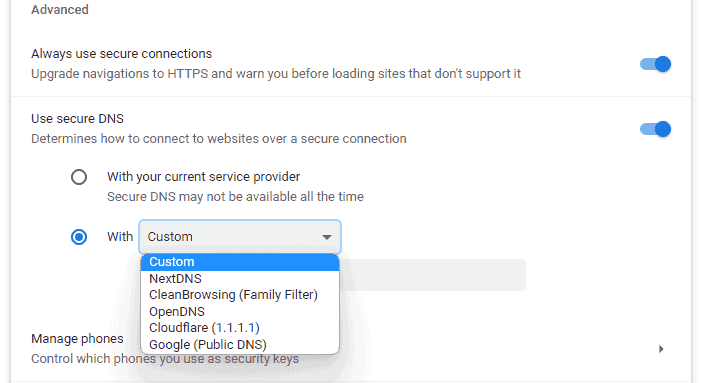
Chrome - DoH configuration
Settings > Privacy and Security > Security > Advanced > Use Secure DNS (Enabled) > With (choose your preferred provider or choose Custom to provide your own).
Firefox - DoH configuration
Settings > General > Network Settings > Enable DNS over HTTPS > Use Provider (choose your preferred provider or choose Custom to provide your own).

Edge - DoH configuration
Settings > Privacy, Search, and Services > Security > Use secure DNS to specify how to lookup the network address for websites > Choose a service provider > Click the box and choose your preferred provider from the list or add your own.

Opera - DoH configuration
Settings > Privacy and Security > System > Use DNS-over-HTTPS instead of the system’s DNS settings > choose your preferred provider or choose Custom to provide your own.

Brave - DoH configuration
Settings > Privacy and Security > Security > Advanced > Use Secure DNS (Enabled) > With (choose your preferred provider or choose Custom to provide your own).

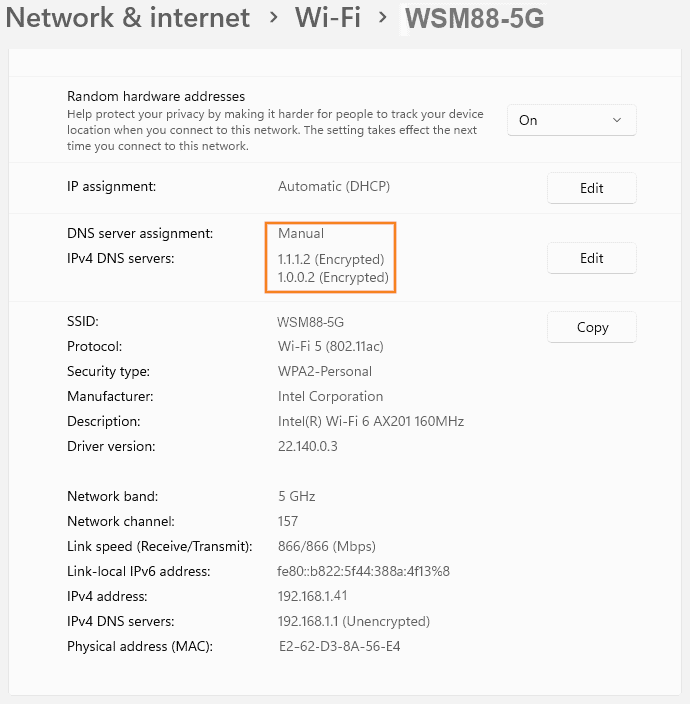
Windows 11 - DoH configuration
Settings > Network & Internet > Adapter (your WIFI or Lan adapter) > Properties > DNS server assignment > Edit > Manual > Preferred DNS > (your preferred DNS address, ex. 1.1.1.2 or 8.8.8.8 or 9.9.9.9)


You can find a complete lists of DoH providers here: https://github.com/curl/curl/wiki/DNS-over-HTTPS#publicly-available-servers
Cloudflare App - DoH configuration
Download the app for your device here: https://1.1.1.1/

There are different modes in the app that you can use:
1.1.1.1
WARP
WARP+ (and WARP+ Unlimited)
1.1.1.1
lets you protect your DNS queries by encrypting them with HTTPS and TLS. Uses Cloudflare's 1.1.1.1 public DNS resolver.
WARP
1.1.1.1 plus DNS requests leverage the Cloudflare global network of data centers.
WARP+
internet requests are routed to avoid Internet traffic jams
(WARP+ Unlimited is available with a monthly subscription.)
Connection settings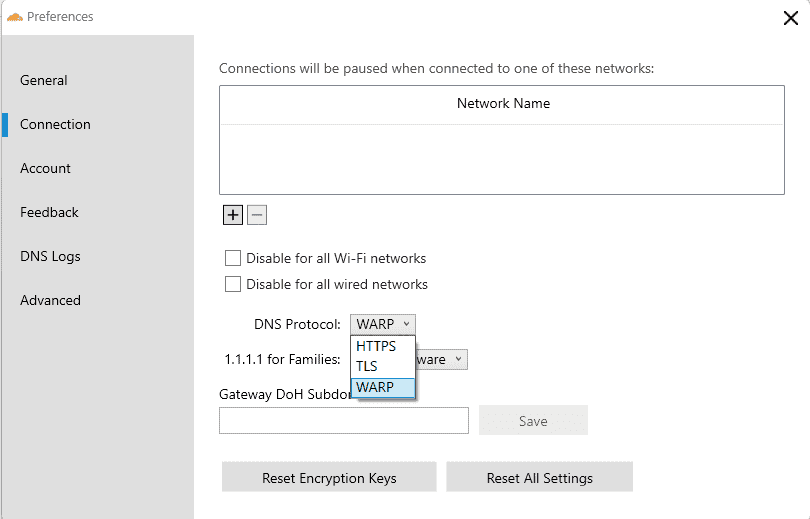
Warp for Families Connection settings


TIP: If you install both the mobile and desktop versions, use the same "Key" found in your account profile for both versions.
WARNING: If you uninstall the Warp client and reinstall, you will get a new "Key". If you have accumulated WARP+ referral credits, they are associated with your key and YOU WILL LOSE ALL CREDITS IF YOU CHANGE KEYS. So be sure to keep a copy of your original key. After reinstalling, you can then click the "Use different key" option and insert your original key to get your credits back.
Managed VPS Hosting


SEMRUSH

 WordPress Social Sharing at the speed of light.
 The Number 1 Web performance plugin for WordPress.

 Cloudflare Warp ·
Jump on the Internet fast lane by installing the WARP app. It's free and protects you from malware and Internet spies! #1dot1dot1dot1 1.1.1.1 — The free app that makes your Internet faster and safer.
Cloudflare Warp ·
Jump on the Internet fast lane by installing the WARP app. It's free and protects you from malware and Internet spies! #1dot1dot1dot1 1.1.1.1 — The free app that makes your Internet faster and safer.