
DANE Email Security

DANE Email Security
DANE: DNS-based Authentication of Named Entities
1. Introduction
DNS-based Authentication of Named Entities (DANE) is an Internet security protocol that allows X.509 digital certificates, commonly used for Transport Layer Security (TLS), to be bound to domain names using Domain Name System Security Extensions (DNSSEC). DANE provides a way to authenticate TLS client and server entities without a certificate authority (CA). In our example we're using our free Let's Encrypt certificate but DANE can also be used with self-signed certificates. While DANE is not fully supported by most browsers, it still provides server to server security.
2. Server Support for DANE
DANE sending mail servers can authenticate legitimate receiving mail servers using SMTP DANE. This authentication makes it resistant to downgrade and MITM (Man in the Middle) attacks. DANE can safely exist along side MTA-STS.
- Exchane Online (Outbound with Inbound due end of 2023)
- Exim
- Halon
- Postfix
- PowerMTA
3. Requirements for Implementing DANE
To implement DANE successfully, several key requirements must be fulfilled. These include:
- DNSSEC Support: DNSSEC (Domain Name System Security Extensions) is a prerequisite for DANE implementation. DNSSEC ensures the authenticity and integrity of DNS data by digitally signing DNS records. The DNS resolver used must support DNSSEC validation.
- Certificate Authorities (CAs) with DANE Support: To leverage DANE, organizations need to obtain digital certificates from CAs that offer DANE support. These certificates should be linked with the corresponding DNS records to establish the necessary trust relationship.
- DNS Hosting and Configuration: The DNS infrastructure must be set up correctly to include the necessary DNS records, including TLSA (Transport Layer Security Authentication) records. These records bind the digital certificate information with the associated domain names.
4. DNS Security Methods Compatible with DANE
DANE is designed to complement existing DNS security methods and can be seamlessly integrated with several widely adopted practices, including:
- DNS-Based Authentication of Named Entities (DANE-TA): DANE-TA enables the use of self-signed certificates or certificates issued by an internal CA. It provides an alternative to traditional certificate authorities and allows organizations to maintain greater control over their digital certificate management.
- Certificate Authorities: DANE can be used in conjunction with traditional CAs to reinforce the trust hierarchy. By associating DNS records with the corresponding certificates, DANE strengthens the verification process and reduces reliance solely on CAs.
- Certificate Transparency (CT): DANE can enhance CT mechanisms by enabling DNS records to serve as an additional means of verifying certificate authenticity. This integration provides an extra layer of trust and enhances overall security.
5. Configuring and Implementing DANE
Configuring and implementing DANE involves a series of steps to establish the necessary DNS records and ensure proper integration with the digital certificate infrastructure. The specific steps may vary depending on the DNS server software and certificate management tools being used. However, the general process typically includes:
- DNS Infrastructure Setup: Ensure DNS servers are properly configured and support DNSSEC validation.
- Generate Digital Certificates: Obtain digital certificates either from DANE-supporting CAs or generate self-signed certificates if using DANE-TA.
- Create TLSA Records: Generate the appropriate TLSA record that binds the digital certificate to the corresponding domain name.
- Publish DNS Records: Add the TLSA records to the DNS zone configuration, making them publicly available.
- Certificate Installation: Install the digital certificates on the servers hosting the respective domains.
- Testing and Validation: Perform thorough testing to verify the successful implementation of DANE and validate the trust relationship between DNS records and digital certificates.
The folllowing example uses Namecheap (registrar), Cloudflare (DNS management) and cPanel/WHM (SSL certificate management). Your dashboards will vary, depending on your registrar, DNS and SSL management.
1. Enable DNSSEC at Namecheap
Namecheap > Domain > Manage > Advanced DNS > DNSSEC (toggle on).
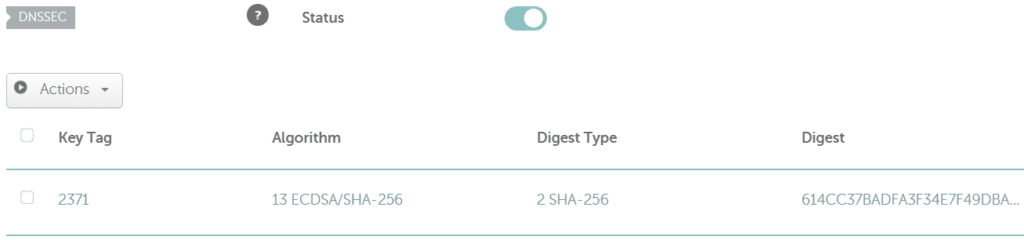
and get values for above when DNSSEC is Enabled at Cloudflare (below).
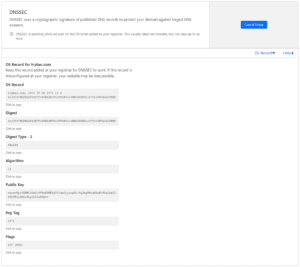
Cloudflare DNSSEC
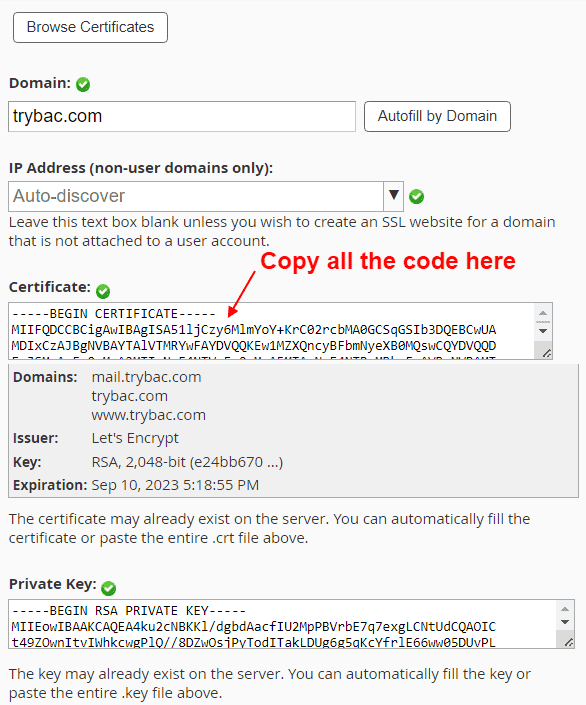
2. If you use WHM > Install an SSL certificate (don't actually need to install, just view) > Copy your Certificate
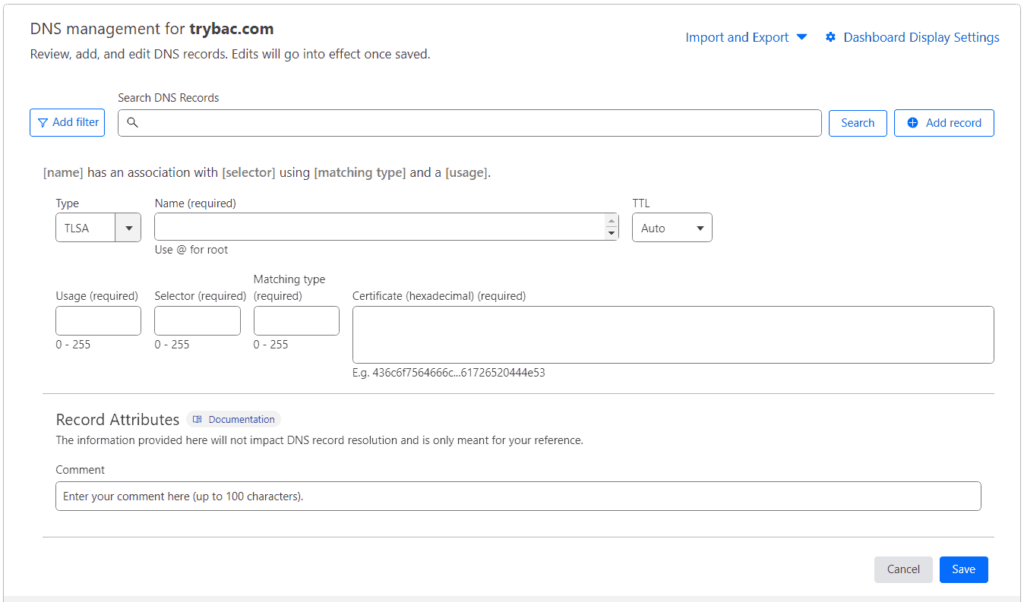
3. Cloudflare > Add TSLA record
Use this DANE generator to get your TSLA values.
https://ssl-tools.net/tlsa-generator
Name would be port and protocol: example: _25._tcp
Usage, Selector and Matching type: Common values are Usage 3, Selector 1, Matching type 1
Certificate: Paste the complete hexacecimal certificate generated
4. Save the TSLA record you just created at Cloudflare (or your DNS management)
5. Check your DANE configuration here:
6. The Future of DANE
As the importance of secure online communications continues to grow, the role of DNS-based security mechanisms like DANE will become increasingly significant. While DANE adoption is still relatively limited, its potential benefits in terms of enhanced security and reducing reliance on traditional certificate authorities are noteworthy.
Looking ahead, it's crucial for browser vendors to expand native DANE support, making it more accessible and easier to implement. Additionally, continued collaboration between the DNS community, CAs, and browser developers will be vital in driving widespread adoption and ensuring interoperability.
DNS-Based Authentication for Named Entities (DANE) is a promising protocol that leverages DNS to enhance online security. By combining the strengths of DNSSEC and digital certificates, DANE offers a robust mechanism for verifying the authenticity and is especially useful in securing SMTP. DANE has the potential to strengthen trust and reduce reliance on traditional certificate authorities.
Managed VPS Hosting


SEMRUSH

 WordPress Social Sharing at the speed of light.
 The Number 1 Web performance plugin for WordPress.

 Cloudflare Warp ·
Jump on the Internet fast lane by installing the WARP app. It's free and protects you from malware and Internet spies! #1dot1dot1dot1 1.1.1.1 — The free app that makes your Internet faster and safer.
Cloudflare Warp ·
Jump on the Internet fast lane by installing the WARP app. It's free and protects you from malware and Internet spies! #1dot1dot1dot1 1.1.1.1 — The free app that makes your Internet faster and safer.